An AI model image generator is a tool that flips a simple product photo into a professional, on-model shot, no studio or photographer required. For fashion brands, this means creating an entire catalog of diverse, high-quality model images in a few hours, not weeks. It completely sidesteps the usual costs of studios, models, and photographers.
The End of Expensive Photoshoots
For as long as anyone can remember, fashion has run on a clunky, expensive cycle: design, produce, and then hit the brakes for a costly, time-sucking photoshoot. This has always been a major bottleneck, pushing back launch dates and chewing through marketing budgets. A single shoot can lock up your resources for weeks, from finding the right talent to endless post-production work.
That old way of doing things is finally being replaced. Imagine snapping a photo of a new jacket on a hanger and, just minutes later, having a dozen different models wearing it in various settings. That’s not the future; it’s what AI is doing right now.
A Fundamental Shift in Creative Production
Think of this like the leap from film to digital photography. All at once, the old barriers of cost, time, and logistics just melt away. An AI model image generator hands brands a level of creative freedom and speed that was unimaginable a few years ago. You’re no longer limited by how many outfits a model can wear in a day or if your preferred photographer is booked. Instead, you can generate an endless stream of visual content whenever you need it.
This isn't just about saving a few bucks—it's about gaining a serious competitive edge. Brands are now able to:
- Test products faster: Generate visuals for a new design to see what customers think before you commit to a full production run.
- Improve personalization: Create marketing campaigns with models that actually look like your specific customer segments.
- Increase diversity: Effortlessly show your products on a huge range of body types, ethnicities, and ages, making your brand feel more inclusive and real.
To put this shift into perspective, let's compare the old way with the new.
Traditional Photoshoots vs AI Image Generation
| Factor | Traditional Photoshoot | AI Model Image Generator |
|---|---|---|
| Cost | $5,000-$10,000+ per shoot (models, studio, photographer, crew) | A low monthly subscription, often under $50, for hundreds of images |
| Time | 2-4 weeks from planning and shooting to final edited images | Under 5 minutes from a product photo to a ready-to-use model shot |
| Flexibility | Limited to the models, outfits, and locations booked for a single day | Unlimited. Generate any look on any model in any setting, on-demand. |
| Diversity | Constrained by casting budget and local model availability | Instantly create images with models of any ethnicity, age, or body type. |
| Revisions | Requires expensive and time-consuming reshoots or heavy editing | Generate a new variation in seconds at no extra cost. |
The table makes it pretty clear. The traditional process is rigid and expensive, while AI offers a fluid, cost-effective alternative that puts creative control back in your hands.
The market is already responding to this. The global AI image generator market is on track to explode from USD 3.16 billion in 2025 to USD 30.02 billion by 2033. This surge is overwhelmingly driven by e-commerce, where AI can slash traditional photoshoot costs—which often run from $5,000-$10,000—by as much as 90%.
By taking the friction out of photography, brands can finally focus on what they do best: designing incredible products, telling compelling stories, and building real connections with their customers. For a deeper dive into how this all works, check out our complete guide on AI product photography. This tech gives you the power to get to market faster and build a stronger, more representative brand.
How AI Turns Product Photos into Model Shots
Ever wonder how an AI takes a flat photo of a sweater and magically puts it on a photorealistic model? It’s not actually magic, but it’s just as impressive. The process is a clever digital collaboration, where the AI learns to understand a garment the same way a fashion designer would—by analyzing its shape, texture, and how the fabric should hang.
At the core of many of these platforms is a technology called a Generative Adversarial Network, or GAN. The name sounds intimidating, but the concept is surprisingly intuitive.
Think of it as a master artist working with a very picky art critic.
- The Artist (the "Generator"): This part of the AI's job is to paint a brand new picture. It takes your product photo and tries its best to create an image of a model wearing it. The first few tries will likely look clumsy and fake.
- The Critic (the "Discriminator"): This second part of the AI has studied thousands of real fashion photos. Its only job is to look at what the Artist made and declare, "This looks real" or "This is a fake."
This back-and-forth happens thousands of times a second. The Artist creates, the Critic judges, and the Artist tries again, getting a little smarter with every attempt. This rapid cycle of creation and critique continues until the Critic can no longer spot the difference between the AI's work and a genuine photograph.
The Product to Model Journey
This process is what allows an AI to intelligently wrap a 2D piece of clothing around a 3D human form. It's not just cutting and pasting your product onto a stock photo; it’s a sophisticated transformation that understands the physics of fabric and light. The journey from a simple flat-lay to a polished final image is a well-defined path.
This is the big shift: what used to be a slow, expensive photoshoot is now a fast, affordable AI generation process.
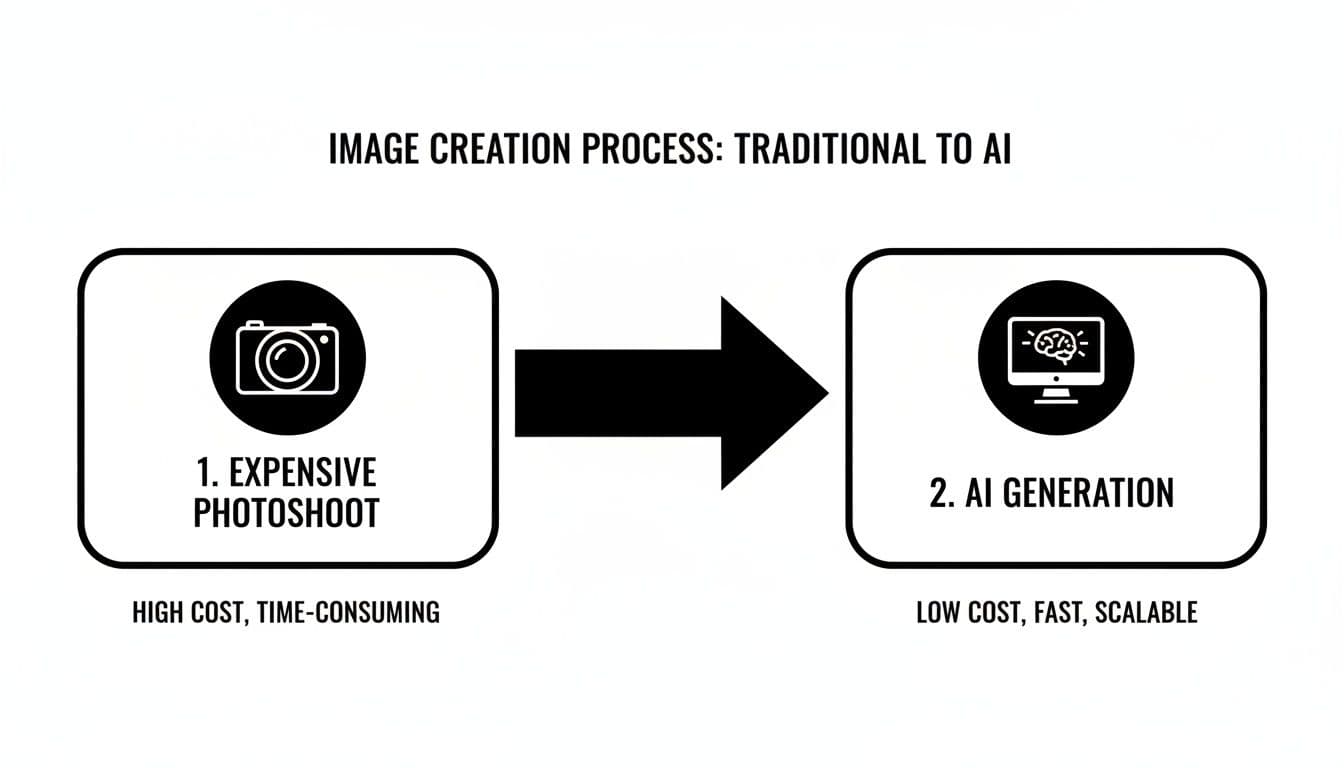
Diagram showing the shift from traditional expensive photoshoots to low-cost, fast AI image generation.
The diagram really says it all. A multi-step, physical production has been collapsed into a single, streamlined digital step, knocking down huge barriers of time and money.
So what’s happening behind the scenes during that digital step? Here’s a breakdown of what the AI is actually doing.
Deconstructing the Garment: First, the AI scans your product photo to understand its core features. It identifies the neckline, sleeve length, hem, and overall shape. It also "feels" the fabric's texture—is it a chunky wool knit, a smooth silk, or a rigid denim?
Mapping to a Virtual Mannequin: Next, the system takes that 2D information and projects it onto a virtual 3D body. This is where the magic really happens, as the AI figures out how the garment should realistically wrap around the model's curves and posture.
Generating Realistic Folds and Shadows: Based on the model's pose and a virtual light source, the AI adds natural-looking wrinkles, folds, and shadows. This step is what creates depth and stops the clothing from looking like a flat sticker pasted onto an image.
Rendering the Final Image: Finally, the system merges the clothed model with your chosen background, making sure the lighting looks consistent across the entire shot. The output is a high-resolution, totally believable image ready for your e-commerce site or marketing campaign.
The whole operation, from uploading your product shot to downloading a final on-model image, can take less than a minute. What once took a full team and weeks of coordination is now an automated, on-demand service.
This product to model technology empowers brands to build an entire library of on-model photos without ever booking a studio. By understanding this workflow, you can see that these images aren't just a gimmick—they're the product of a detailed and intelligent process built to deliver professional, authentic visuals.
Winning E-Commerce and Marketing Strategies
It’s one thing to understand the tech behind an AI model image generator, but it’s another to turn that tech into actual business growth. This is where the rubber meets the road. Fashion brands are finding some seriously powerful new ways to grab customer attention, push sales, and build a brand that people remember.
And it’s not just about saving a few bucks on photoshoots. These strategies directly change how shoppers see and connect with your products.
Modern e-commerce is a visual game. Full stop. When visuals drive 93% of purchases, the quality and relevance of your images can make or break a sale. Brands in North America, which holds over 41% of the global AI image generator market, are already seeing huge wins. For example, some brands report a 30-50% lift in ad performance just by switching from generic stock photos to AI-generated images with specific poses. That's a massive advantage.
Reinvent Your E-commerce Product Listings
The fastest, most direct impact you can make is on your product detail pages. Think about it. Instead of showing a single shirt on one model—or worse, just a flat-lay photo—you can instantly create a whole gallery showing that shirt on a diverse lineup of virtual models.
This simple change lets every single customer see someone who looks like them wearing your stuff.
With one move, you accomplish a few critical goals:
- Boost Representation: Effortlessly feature your clothing on a huge range of ethnicities, ages, and body types.
- Increase Conversion: When shoppers can actually picture themselves in an outfit, they’re way more likely to buy.
- Cut Down on Returns: Giving a better visual reference helps customers nail their sizing and style choices from the get-go.
Your product page goes from a boring listing to an inclusive, personal shopping experience. You're showing modern customers you see them and get what they're looking for.
Create an Endless Stream of Social Media Content
Social media feeds are hungry, demanding a constant flow of fresh, eye-catching content. A traditional photoshoot gives you a fixed set of images that get old fast. An AI model generator completely solves this. It’s like having an infinite well of unique, on-brand creative.
You can spin up hundreds of variations for just one product. Imagine running an ad campaign for a new dress by showing it on five different models, in five different settings, with five totally different vibes. A/B testing at that scale used to be impossibly expensive. Now, you can do it on a whim. This lets you dial in your campaigns for the best possible engagement and ROI without ever running out of fresh visuals.
Build a Brand That’s Instantly Recognizable
Strong brands are built on consistency. You use the same logo and color scheme, right? Using a consistent group of AI models across all your channels builds that same powerful brand identity. You can even create a "brand model"—a familiar face that shows up on your website, in your emails, and across social media.
This strategy instantly makes your brand feel more professional and put-together. It weaves a consistent visual story that customers start to connect with your unique style, building trust and recognition over time. And you get all of that without the logistical headache of trying to book the same human model for every single campaign.
Of course, generating images is just one piece of the puzzle. It helps to understand the bigger picture of how AI is changing online retail. Digging into how AI automation helps Shopify stores, for instance, can shed light on improving other parts of your business. These strategies prove that an AI image generator isn't just a photography substitute—it's a real tool for growth.
Your Step-By-Step Guide to AI Image Generation
Jumping into an AI workflow might feel like a huge leap, but it's more like a few simple steps. When you break it down, any fashion brand can go from a flat product photo to a stunning, on-model campaign shot in minutes.
Think of this as your roadmap. It’s a straightforward process that boils down to three key stages: preparing your shots, directing the virtual scene, and finally, generating the magic. Let's walk through it.
A laptop shows fashion photography tutorials, a camera, and clothes on a rack in a studio setting.
Step 1: Prep Your Product Shots for Success
The old saying "garbage in, garbage out" is especially true here. The quality of your final AI-generated image depends entirely on the quality of the photo you start with.
The AI needs a crystal-clear view of your garment to properly understand its texture, shape, and how it drapes. For best results, use a simple flat-lay or hanger shot. This gives the AI model image generator clean, undistorted information to work with, free from the odd angles or stretching you'd get from a mannequin.
Here's how to get it right:
- Use Diffused, Even Lighting: Harsh shadows are the enemy. They hide details and confuse the AI. Soft, consistent light—like from a large window on an overcast day or a studio softbox—is perfect for showing off the fabric's true color and texture.
- Shoot Against a Neutral Background: A clean white, grey, or light-colored wall is your best friend. It removes distractions and helps the AI cleanly isolate the garment.
- Capture a High-Resolution Image: More pixels mean more detail. A sharp, high-resolution photo gives the AI more data to work with, leading to a much more realistic final image. Make sure the entire product is in focus.
To make this even simpler, here's a quick checklist to follow before you upload anything. Getting these details right at the start is the secret to getting incredible results from the AI.
Asset Preparation Checklist for Optimal AI Results
| Asset Type | Lighting & Background | Angle & Resolution | Key Tip |
|---|---|---|---|
| Garment Photo | Diffused, even light; neutral, non-distracting background. | Straight-on (flat-lay or hanger); high-resolution (3000px+). | Ensure no harsh shadows obscure fabric details. |
| Model Face (Optional) | Studio-style, forward-facing, neutral expression. | Clear headshot, high-resolution. | Use consistent lighting across all model photos for brand cohesion. |
| Background Image (Optional) | Well-lit, high-quality stock or original photo. | At least 1080p, clear focus area. | Choose backgrounds that match your brand's aesthetic (e.g., urban, nature, studio). |
Nailing these simple prep steps will dramatically improve the final output, saving you time and frustration down the line.
Step 2: Choose and Customize Your Virtual Model
This is where your creative vision takes over. Once your product shot is uploaded, you become the casting director and art director all at once. It’s all about matching the virtual elements to your brand's unique vibe.
You can select from a huge library of diverse virtual models, making it easy to represent every part of your audience. But it goes way beyond just picking a face. You get to fine-tune every detail, from the model's pose to the overall mood. Want a powerful stance for a sharp blazer? Or a relaxed, casual pose for cozy loungewear? It's all possible. Sophisticated platforms even offer precise pose control for ultimate creative freedom.
To finish the scene, you just pick a background that ties it all together. Whether you're going for a minimalist studio look, a gritty urban backdrop, or a dreamy outdoor landscape, the perfect setting is just a click away.
Step 3: Generate and Deploy Your Final Images
You've done the prep work. Your product is uploaded, and you've art-directed the perfect scene. The last step is the easiest.
You just hit "generate."
In seconds, the AI takes all of your inputs and composites them into a professional, photorealistic image. It’s your garment, on your chosen model, in the perfect setting.
And you don't just get one image. From a single product photo, you can create dozens of variations with different models, poses, and backgrounds. This lets you build out a full gallery for a product page or A/B test different creatives for your ad campaigns in a snap.
Once generated, the images are ready to go. You can download them instantly and use them across all your marketing channels:
- Your e-commerce website and product pages.
- Dynamic social media posts for Instagram, TikTok, and Facebook.
- High-converting digital ad campaigns.
- Email marketing and promotional newsletters.
This simple, three-step process tears down the old barriers of time and money, making world-class, on-model photography something any brand can create on demand.
What's the ROI? And Can I Even Use These Images?
Whenever you're looking to bring a new tool into your business, two questions always come up first: "What's the return?" and "Is this even legal to use?" These are the right questions to ask, and before you jump into an AI model generator, you need solid answers.
The good news? Both the financial upside and the legal side of things are much clearer than most people think.
Measuring the Financial Impact
Let's start with the money. The most obvious win is ditching traditional photoshoots. You can immediately say goodbye to invoices for studio rentals, photographer day rates, and model casting fees. But the real value isn't just about cutting costs—it’s about what this new capability unlocks for your business.
The return on investment (ROI) from an AI image generator isn't just one number; it shows up across your business in efficiency, customer engagement, and straight-up sales. If you want to get into the weeds, you can use a standard framework like this guide on How to Calculate Marketing ROI and apply it to your creative spending.
Here’s where you’ll see the biggest, most measurable returns:
- Massive Drop in Cost-Per-Image: Think about it. A standard photoshoot might run you $5,000 and deliver 20 edited shots. That’s $250 per image. With an AI tool, a modest monthly fee can get you hundreds of images, bringing your cost-per-image down to pennies.
- Higher Conversion Rates: This is a big one. When you can show your products on a wide variety of models, more customers can see themselves wearing your clothes. That feeling of "that could be me" is a powerful driver for add-to-carts and final purchases.
- More Efficient Ad Spend: AI lets you test dozens of ad creatives without any extra production cost. You can A/B test different models, backgrounds, and styles to see what actually resonates with your audience. This process quickly reveals the winning visuals, driving down your customer acquisition cost (CAC) and boosting your return on ad spend (ROAS).
By tracking these numbers before and after you start using an AI generator, you’ll have a clear, data-driven case for its value.
Navigating Commercial Usage Rights
The second piece of the puzzle is the legal one. Can you actually use these AI-generated images on your website, in your paid ads, and across social media without getting into trouble? The answer comes down to one simple thing: the kind of tool you choose.
This is the most important distinction to understand: using a generic AI art generator for your business is a massive legal gamble. Using a dedicated commercial platform is safe.
General-purpose AI art tools are often a legal minefield. Many were trained by scraping copyrighted images from all over the internet without permission. If you use their output in your marketing, you could be opening your brand up to a copyright infringement lawsuit. On top of that, U.S. copyright law typically requires a human author, so images created entirely by AI from a simple text prompt often can't be copyrighted. This leaves your brand's visual assets completely unprotected.
A business-first AI model image generator like WearView, on the other hand, is built from the ground up for commercial use. These platforms are designed to protect you. They use ethically sourced or fully licensed data for training their models.
Most importantly, they grant you a full, royalty-free commercial license for every image you create. This means you own the rights to use those visuals anywhere you want—on product pages, in Facebook ads, on billboards—without ever worrying about surprise fees or legal threats down the line. It's the only professional, safe way to bring AI imagery into your brand.
Avoiding Common Mistakes with AI Imagery
Getting started with a powerful tool like an AI model image generator has a bit of a learning curve. It's an intuitive technology, for sure, but a few common trip-ups can derail your first attempts. If you know what to watch for, you can create flawless, professional visuals from day one and avoid the classic mistakes that make AI content feel cheap or untrustworthy.
The goal isn't just to make images that are good enough. It's to make them truly exceptional.
Man digitally editing a fashion photo of a woman in a green dress on a large touchscreen with a stylus.
Escaping the Uncanny Valley
The biggest and most famous trap is the "uncanny valley." This is that weird feeling you get when an image looks almost real, but something is just a little bit off. Early AI models were notorious for this, churning out hands with six fingers or skin that looked like plastic.
Modern platforms have gotten much, much better, but you still need a good eye for the details.
Solution: Treat every AI output like a high-quality first draft. Don't hesitate to pull it into a photo editor for tiny touch-ups. A quick lighting tweak, a subtle crop, or a minor color correction is often all it takes to push an image from 95% perfect to 100% believable. That last 5% is where you earn your audience's trust.
Preserving Your Brand Authenticity
Another classic blunder is letting the AI’s style run over your brand's unique personality. It’s easy to generate technically flawless but totally generic images that could belong to any of your competitors. When your visuals lose their distinct feel, your brand gets watered down.
Your AI imagery has to feel like yours. It’s about more than just slapping a product on a model.
- Consistent Aesthetics: Use models, backdrops, and lighting that match your established brand look. If you're known for a bright, airy vibe, don't suddenly start generating moody, high-contrast scenes.
- Unique Posing: Pick poses and expressions that scream your brand's attitude—whether that’s bold and confident or relaxed and down-to-earth.
- Curated Environments: Choose backgrounds that tell your brand's story and reinforce the lifestyle you're selling.
This kind of careful curation makes sure your AI visuals are building your brand, not making it anonymous.
Moving Beyond Default Settings
Simply sticking to the default presets is a huge missed opportunity. The real magic of an AI model generator is in its customization controls. Too many brands make the rookie mistake of picking the first model and background they see, which is a recipe for cookie-cutter content.
To create visuals that actually stand out, you have to get in there and play with the controls. This is what separates amateur work from professional, campaign-ready assets. Fine-tuning the details helps you build a visual story that is completely unique to you, ensuring your products get noticed in a very crowded market.
By steering clear of these common mistakes—dodging the uncanny valley, holding on to your brand's soul, and customizing your outputs—you'll get the hang of this technology way faster. The result is professional, high-quality content that builds brand equity and drives real business results.
Common Questions
Diving into any new technology always brings up a few questions. To make sure you're totally comfortable before getting started, we've put together answers to the most common things people ask about using an AI model image generator for fashion.
This is where we'll tackle those last-minute curiosities, from keeping your brand look consistent to just how simple it is to get going.
Can I Use the Same AI Model for All My Products?
You absolutely can. In fact, that's one of the smartest ways to build a powerful brand identity. Using the same virtual model across your entire product catalog and marketing creates a look that’s instantly recognizable.
Think of it exactly like hiring a human brand ambassador. When your customers see the same face connected to your brand again and again, it builds a sense of familiarity and trust. It makes your whole visual story feel more professional and put-together.
What Kind of Product Photos Work Best?
For the most believable results, you want to start with clean, well-lit photos of your clothing. The best shots are usually a flat lay (where the item is laid out flat on a simple surface) or a hanger shot against a plain, neutral background.
This approach gives the AI the cleanest possible information to work with. When you get rid of distracting backgrounds and make sure the whole garment is visible, you’re helping the AI accurately see the fabric's texture, shape, and how it drapes. That's the secret to getting a much higher-quality on-model image.
Are AI-Generated Model Images Legally Safe for Ads?
Yes, but only if you use a platform built specifically for commercial use. This is a huge distinction. Professional services grant you a full commercial license for every single image you create.
This means you have clear, legally-binding permission to use the images in your ads, on your e-commerce store, and all across your marketing channels. You won't have to worry about royalties or copyright problems down the line. General-purpose AI art tools often don't offer this protection, which makes a commercial-first platform the only safe bet for your business.
How Hard Is It to Get Started?
It’s surprisingly easy—you don't need any technical skills at all. Modern platforms that offer an AI model image generator are designed with simple, user-friendly interfaces. The whole process is meant to feel natural.
Most of the time, it's as simple as these three steps:
- Upload your clean product photo.
- Pick a virtual model and a pose from the curated menu.
- Hit the "generate" button.
In just a few moments, you have a professional image ready to go. It’s a straightforward workflow that puts powerful creative tools in the hands of anyone on your team, no matter their tech skills.
Ready to stop spending on photoshoots and start creating instantly? With WearView, you can generate an entire catalog of on-model images in minutes. Explore WearView today and see how easy it is.
Tags:
WearView Team
WearView Content & Research Team
WearView Team is a group of fashion technology specialists focused on AI fashion models, virtual try-on, and AI product photography for e-commerce brands. We publish in-depth guides, case studies, and practical insights to help fashion businesses improve conversion rates and scale faster using AI.